
Working in Acta
Views
A space can be read five ways. They are the same cards, not five feature sets.
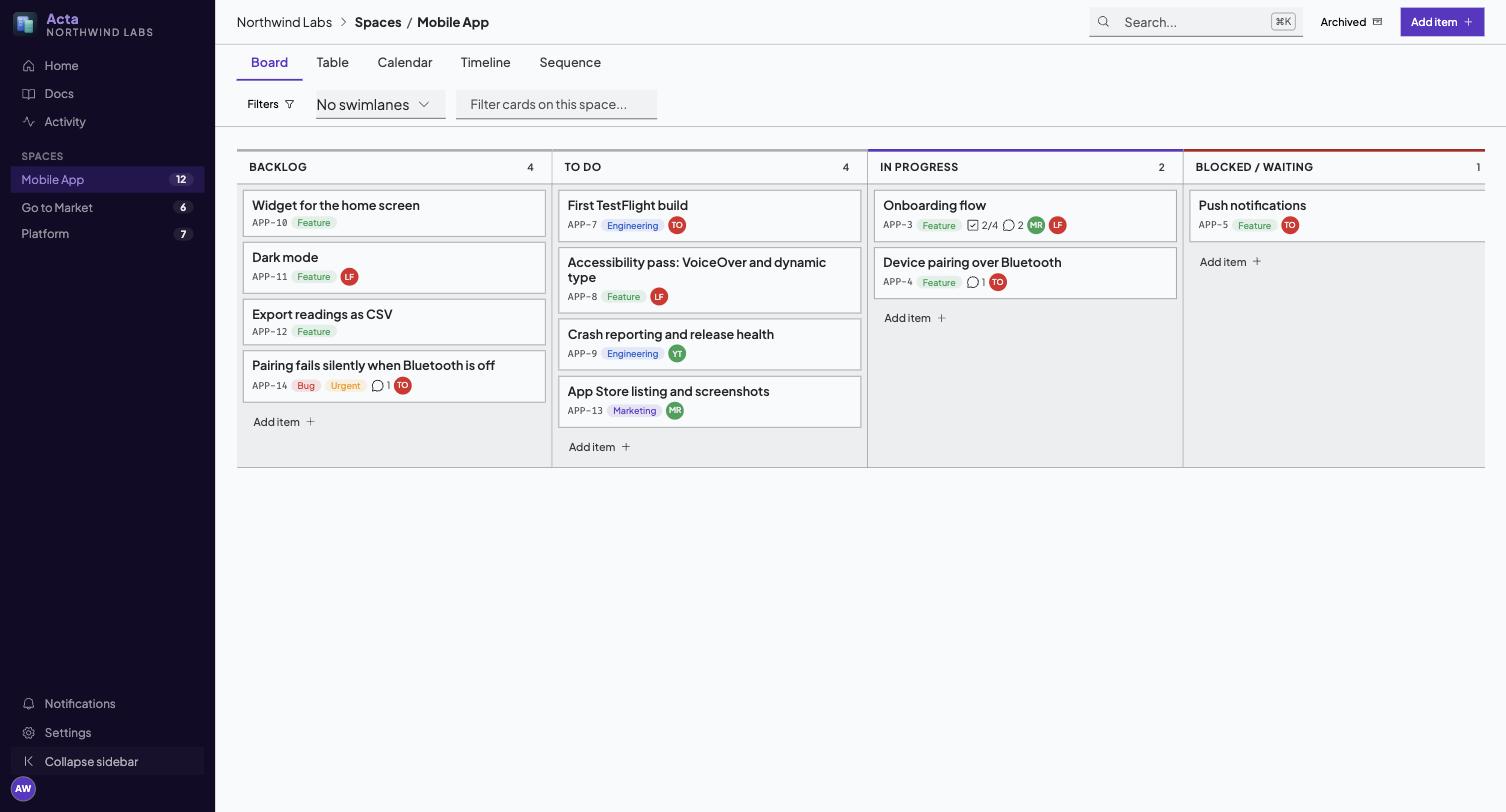
Board is the default: lists as columns, cards in them, drag to move. Column headers stay put as you scroll. Swimlanes split the board into horizontal bands by assignee, label or status, which is how you see that one person holds nine of the twelve in-progress cards.
Table is the one to use when you want to compare rather than move: sortable columns, every field visible at once.
Calendar places cards with due dates. Timeline draws them as bars. Cards without dates do not appear in either, which is most of them in most projects, and is why the fifth view exists.
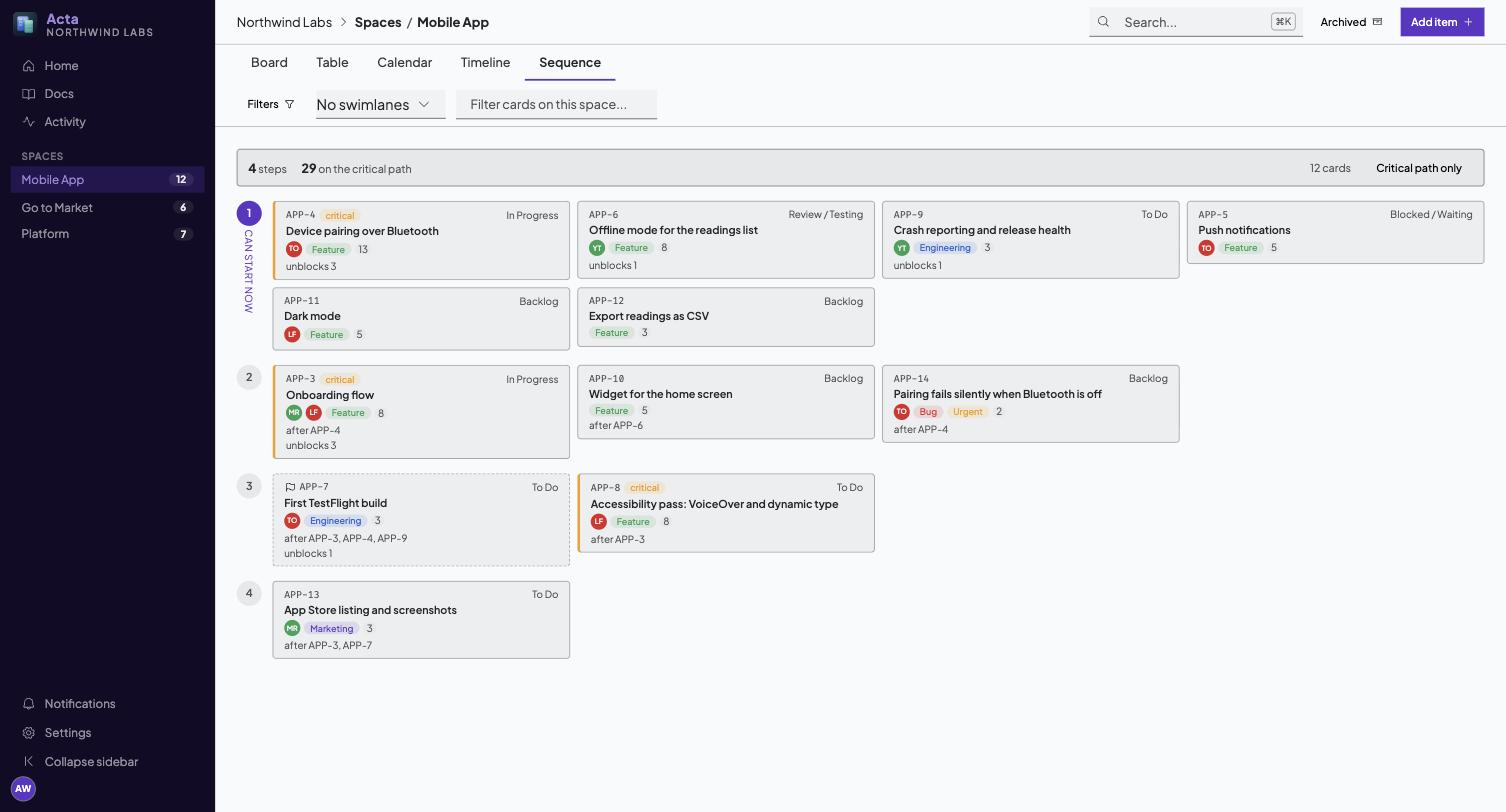
Sequence draws the plan as an order rather than as dates. It reads top to bottom in numbered steps: everything in step 1 can start now, everything in step 2 waits on step 1, and so on. The critical path is highlighted: the longest chain by size, the one where a slip slips the whole finish. Critical path only filters to it.
Sequence is computed from dependencies you declare, not guessed. If nothing declares a dependency, everything is in step 1, which is correct and not very useful.
Cards
Open a card in the side inspector, or press the expand control for the full modal. Both show the same thing.
Status, list, due date, assignees and labels are always visible. Description, comments, checklists, attachments, plan and history are in sections you can collapse, so a long description cannot bury the comments underneath it.
Plan
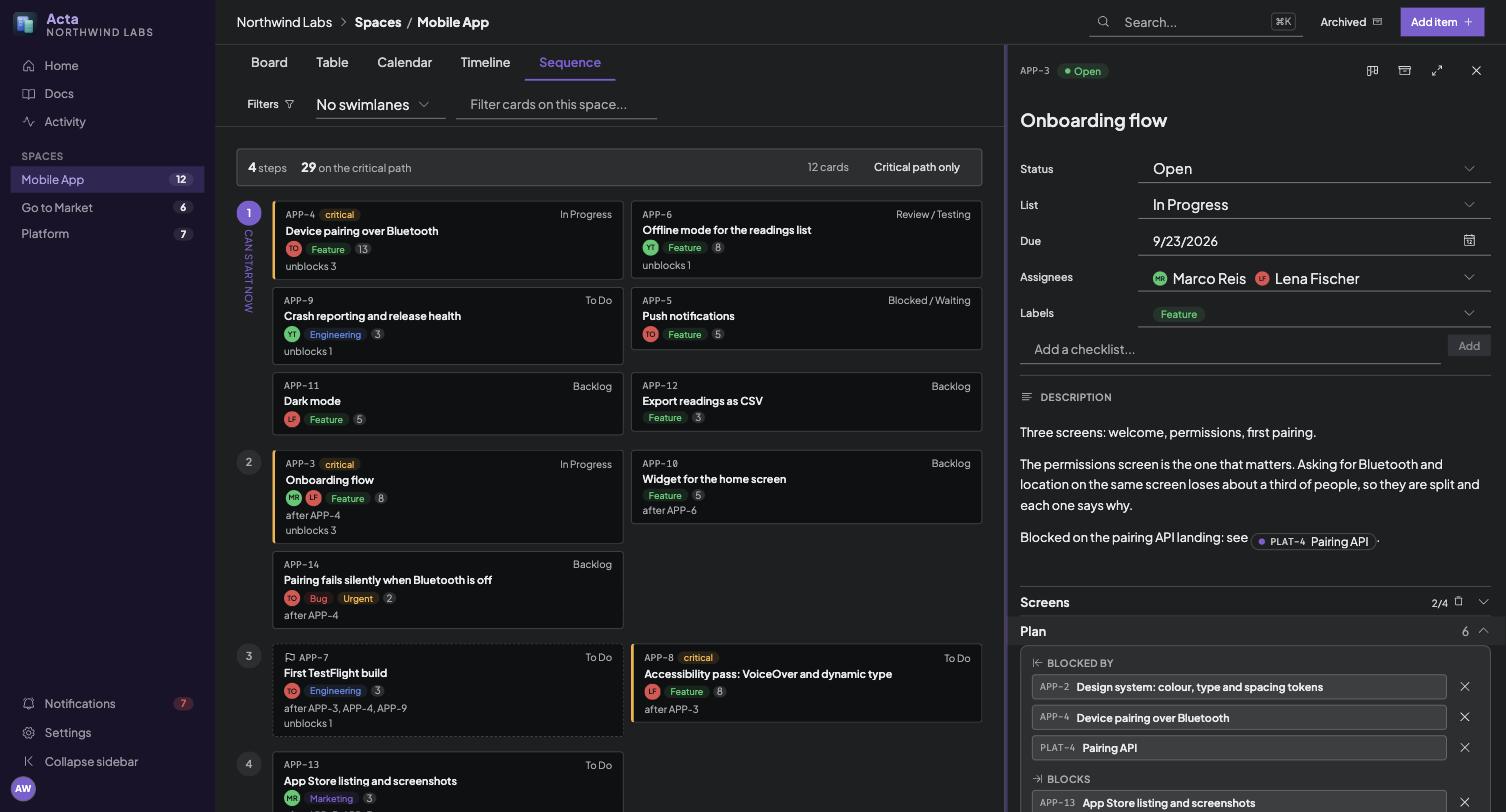
The Plan section is where a card takes its place in the sequence:
- Blocked by and Blocks: pick a relation, pick a card. Cycles are refused, with the two cards named.
- Size: a unitless estimate. It feeds the critical path. A card with no size counts as 1.
- Milestone: marks a card as a point worth reaching.
Comments
[[@handle]] notifies that member. [[ENG-142]] links to a card, [[doc:manual/vision]] to a document. References are extracted on save, so the target knows it was mentioned.
Documents
A tree of Markdown pages in the left rail. Every save makes a version, and you can read or restore an old one.
Reorganise the tree by dragging. Drop a page on the middle of another page to put it inside, as the last subpage. Drop it on the top or bottom edge of a page to put it just before or after that page, at the same level. Dropping beside a top-level page, or on the "Drop here to move to the top level" area that appears under the tree while you drag, makes it a top-level page. A page always moves with all of its subpages, and a page cannot be dropped inside itself or its own subpages, so no drop marker appears there.
From the keyboard, open a page and use Move page (the arrow button next to the page actions, or the command palette) to pick its new parent or the top level. You need write access for either. Read-only members see the tree as it is.
Moving a page never changes its address. A page keeps its slug wherever it goes, so its URL, every [[doc:...]] reference and every heading or block link to it keep working. That means a slug such as home/manual/icon-system may no longer spell out where the page now lives. That is deliberate: links that survive a reorganisation matter more than a tidy path.
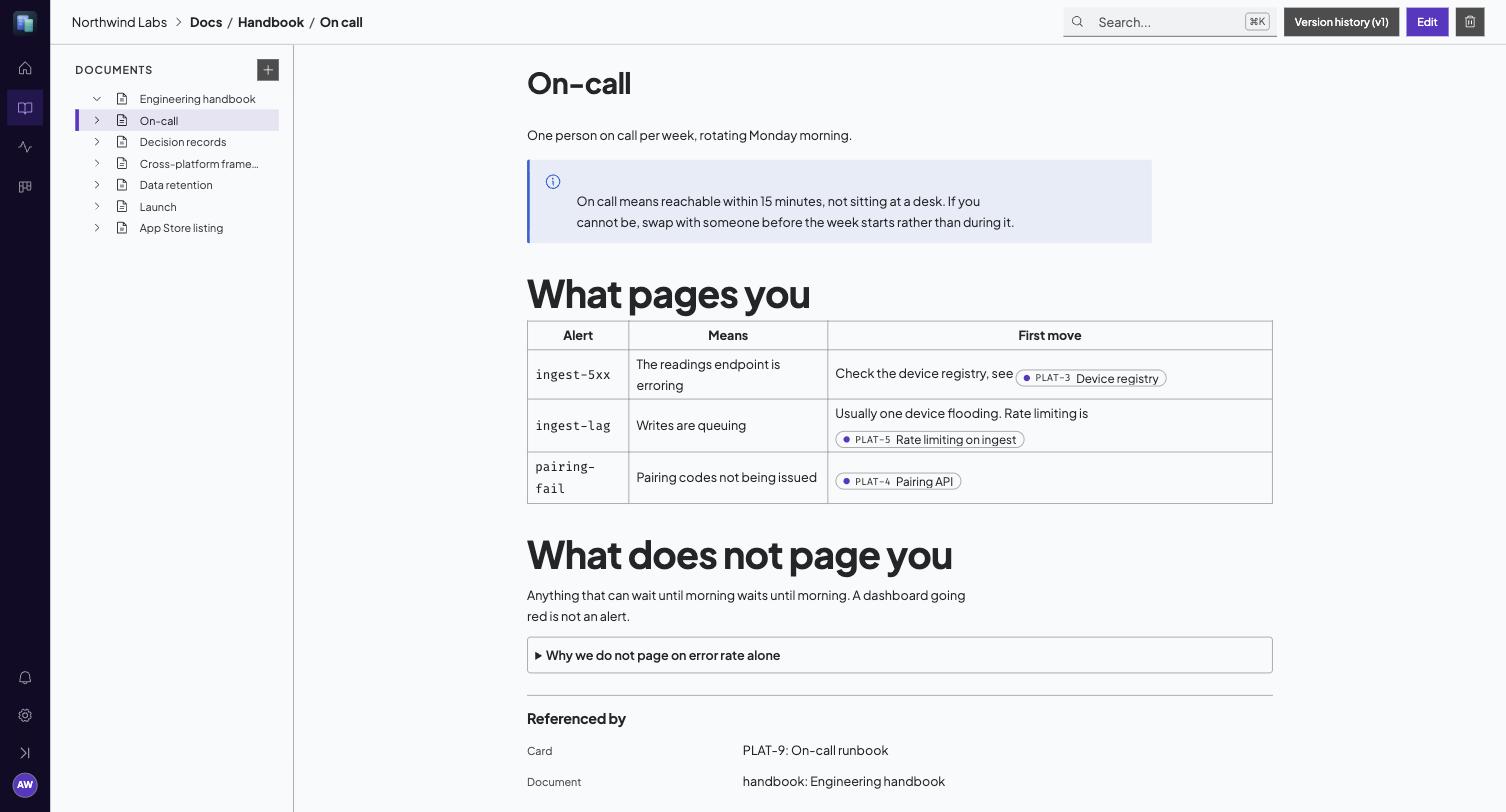
On top of CommonMark and GFM:
> [!TIP]
> Callouts, in the GitHub style.

:::details Click to expand

Collapsible content, including lists, code and another toggle.

:::

See [[ENG-142]] and [[doc:manual/vision|the vision]].

![[query: space=ENG list="In Progress"]]
The last one is a live embed: the matching cards render in the page and stay current. It is how a status page stops being a lie a week after it was written.
Maths and diagrams
Formulas are LaTeX, and diagrams are Mermaid. Both render in the page and in the editor.
The identity $e^{i\pi} + 1 = 0$, inline.

$$
\int_0^1 x^2 \, dx = \frac{1}{3}
$$

```mermaid
graph TD;
  Draft-->Review;
  Review-->Published;
```
Click a formula to edit its source, click away to see it drawn. For a diagram, put the caret in the block to get the source back. Something that will not parse shows the error where the drawing would be, so a typo is visible and fixable rather than a gap in the page.
Inline maths is deliberately strict about what counts as a formula, so ordinary prose is left alone: $5 and $10, $PATH and anything inside backticks or a fenced block are never read as maths. A single dollar you want kept literal can be written \$.
Link previews
A URL on a line of its own becomes a card: the page's icon, title, description, site and picture. A URL inside a sentence stays an ordinary link, because that is where you meant it to read as one.
Worth reading:

https://example.com/the-article
Nothing is added to the document. What is stored is still the plain URL, so a page written before this existed already shows its cards, and a page exported somewhere else is unaffected.
The metadata is read by the server, not by your browser, and kept for a day, so a page of twenty links opens in one request. Acta only fetches public addresses: an intranet or localhost URL is refused, and so is any name that resolves to a private address. When there is nothing to show, for that reason or because the site publishes no metadata, the link simply stays a link.
Blocks
While editing, the margin beside each block (a paragraph, a list, a table, a callout) shows a + and a grip:
+opens the insert menu for a new block below. Nothing is added until you pick something, so closing the menu leaves the page as it was.- Drag the grip to move the block. From the keyboard, focus the grip, press
Spaceto pick the block up, the arrow keys to move it, andSpaceagain to drop it.Escapeputs it back. - Click the grip, or press
Enteron it, for its actions: turn it into another kind of block, duplicate it, copy a link to it, or delete it.
The grip acts on whole blocks at the top of the page. A list moves as one list, not item by item. Turn into only offers what keeps your words, and says so when a change drops formatting or clears ticked tasks.
Copy link to block gives you a link that scrolls straight to that block and marks it for a moment. It finds the block by its text, so it keeps working after the page is edited around it. If the block has since been removed, the page opens at the top and tells you. Nothing about the link is stored in the page itself.
Search
Cmd/Ctrl + K anywhere. It covers card titles and descriptions, comments and documents in one index, and it is also how you jump to a card by key.
Notifications
The bell shows what you were mentioned in, assigned to, or are involved in. Involvement means you commented, were assigned, or created the thing.
Browser notifications must be granted from a real click, so the first time you enable them Acta asks. Without permission the bell still works, you simply have to look at it.
Settings
Four sections, grouped by what you are trying to do.
People is who can sign in. Only people can be assigned work or mentioned.
Labels is the vocabulary your cards are filed under.
Automation is everything that happens without a person, arranged by which way the work flows: ingest endpoints take a URL you paste into a website form, connections let a provider like GitHub push signed events in, webhooks post events back out to your systems, rules are Acta reacting to itself, and agent tokens are credentials for a script that acts under its own name.
Your account is the only one that is not administrative, and every member has it. It holds your own access tokens, which let a tool act as you rather than as a bot, and your connected applications, which is where you disconnect something like Claude that you signed in through.
The distinction worth holding on to is whose name ends up in the history. An access token is you. An agent token, an ingest endpoint and a connection are each their own identity, which is why a card raised by your contact form says it came from the contact form rather than from whoever set it up.