
Two signals, kept apart
Every goal carries two things, and the whole point is that they are separate.
Status is a person's judgement. The owner, or anybody steering the goal, says where it stands:
| Status | Means |
|---|---|
| Pending | Agreed, not really started |
| On track | Going as planned |
| At risk | Could slip without help |
| Off track | Will not land as planned without a change |
| Done | Achieved |
| Paused | Deliberately on hold |
| Cancelled | No longer pursued |
The first four are a goal in flight. The last three are a goal somebody has stopped steering, and none of them is ever flagged as late or quiet.
Progress is measured, never typed. Acta counts the cards that serve the goal and how many of them are done, on every read, so it cannot drift from the cards themselves.
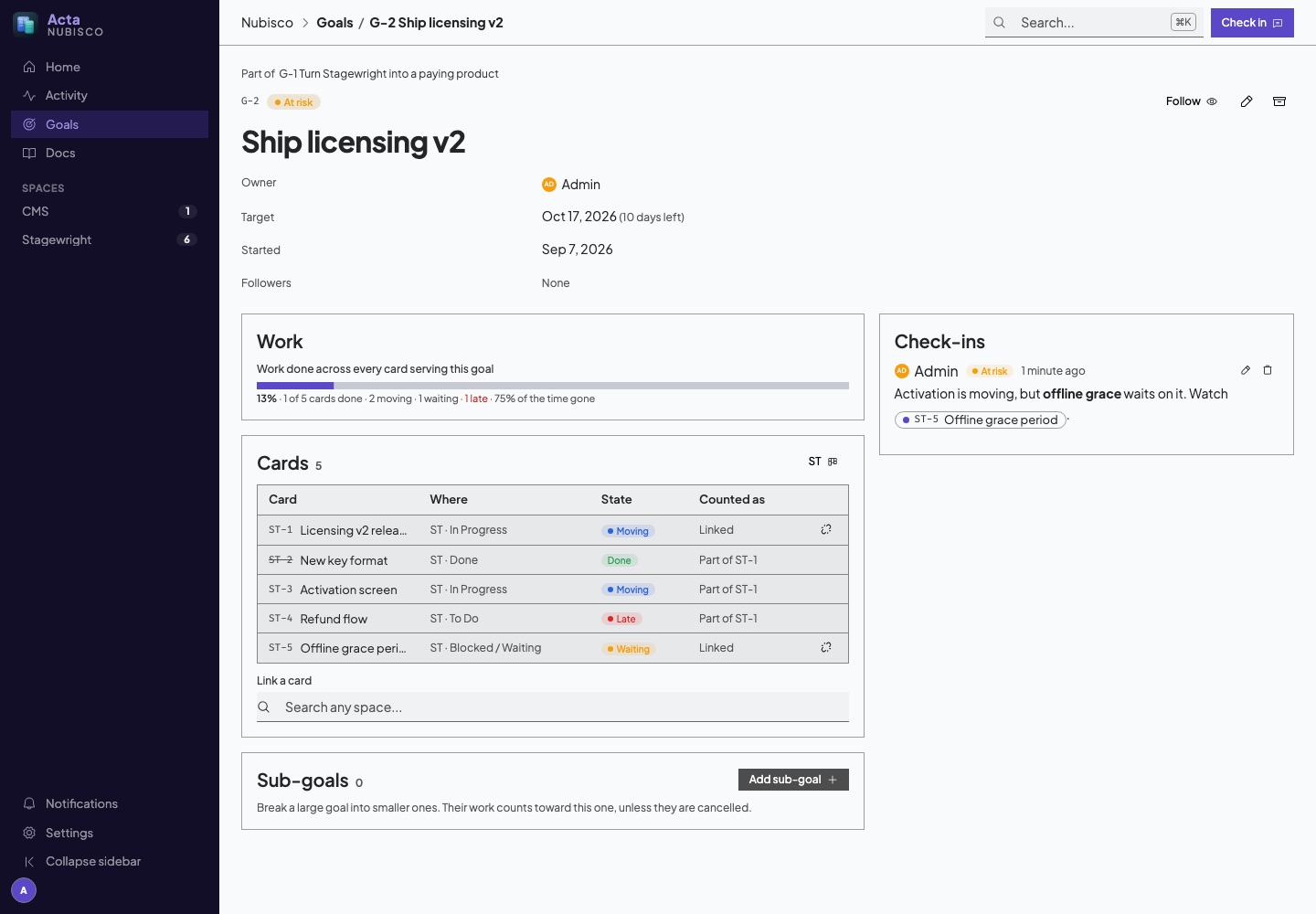
They can disagree, and that is the reason to look. A goal whose work is 90% done can be off track because the last 10% is the hard part. A goal with nothing built can be on track in its first week. On a goal's page the work is on one side and the check-ins are on the other, so a disagreement is in plain view.
Which cards count
A card can serve several goals. Link it from the goal's page (search any space), from the card's own Goals section, or from "No goal" on the card on its board. On a board every card shows the goal it serves, inherited ones included, with a dot for how that goal stands.
- Linking a card counts its parts. Everything that is part of a linked card counts too, at any depth and on any space. Link the card that stands for a release and the release's whole tree comes with it. On the card, an inherited goal says where it comes from ("through ST-12"), and can only be unlinked on the card that carries the link.
- Sub-goals roll up. A goal can be part of another goal. A parent's progress is its own cards plus all of its sub-goals' cards. Cancelled and archived sub-goals are left out: that is work somebody decided not to do, and counting it would hold the parent below 100% for ever.
- Each card counts once, however many routes lead to it.
- Archived cards do not count. A card is done when it is completed or sits in a list whose role is done.
Progress is weighed by each card's size, so a card sized 5 is five times the work of a card sized 1. An unsized card counts as 1, which means a team that never sizes anything simply gets "cards done out of cards".
Alongside done, a goal says how many of its cards are moving (in an active or review list), waiting (in a blocked list, or waiting on a card that is not done) and late (past their due date).
The goal's cards
The Cards panel on a goal's page lists every card the goal counts itself. Each row says where the card lives, how it stands and whether it is linked or counted as a part, and the Assignees column shows who is on it: up to three faces, then "+N" for the rest. Hover or focus a face for the person's name. A card nobody is on reads Unassigned, so the free work is easy to spot when you are looking for what to pick up next. Click any row to open the card.
Tree in the panel's header shows the same cards as a tree instead. Each linked card sits at the top with its parts nested under it, at every depth, and under each card the cards still blocking it, marked in red. A blocker can live on any space and need not serve the goal at all. It drops out of the tree as soon as it is completed or archived. The tree opens fully expanded, and the caret on a row folds or unfolds what is under it (or use the arrow keys). Clicking a card, or a blocker, opens it. Your browser remembers whether you last looked at the list or the tree.
To see a goal's cards on a board, use the space buttons on the goal's page, or pick the goal in a space's filters. The filter shows exactly the cards the goal's progress is counted over, sub-goals and parts included.
Check-ins
A check-in is a dated word on where a goal stands: a status, a sentence or two on what changed and what is next, and the metric's new value if the goal has one. Check-ins are the only way a goal's status changes after it is created, so every change of status arrives with the reason for it.
- The goal's owner and followers are notified, by the bell and, if they are not read, by the usual reminder.
@handlein the note brings somebody else in. - A goal in flight that nobody has checked in on for 30 days is marked No check-in for a month. Atlassian prompts goal owners monthly, and a goal nobody has spoken about in a month is one nobody is steering, whatever its status still says.
- A check-in is edited only by its author. Deleting one follows the workspace's comment rule, and deleting a check-in removes the note without rewinding the status: the goal keeps the status it has until somebody posts a new one.
A number to move
A goal can carry one metric, the "key result" of an OKR: a name, a unit, where it starts and the target, such as Monthly recurring revenue, € 2,000 to € 10,000. A check-in can report the current value, and the goal shows how far along the metric is. A target lower than the start is fine; plenty of goals are about bringing a number down.
The metric is a third signal, beside status and work. A goal can have all its cards done and still be short of its number, which is exactly when it is worth knowing.
Owners, followers and dates
- Owner: the person steering the goal. Whoever creates a goal owns it unless they choose otherwise. Owners are people only.
- Followers: anybody who wants to hear about check-ins. Follow from the goal's page.
- Start and target date: with both, the goal shows how much of its time has gone beside how much of its work is done. A goal in flight past its target date is flagged as past its date.
Goals are numbered per workspace, G-1, G-2, and a number is never reused, even after a goal is deleted. Write [[goal:12]] in any card, document or comment and it becomes a link to that goal, showing its name.
Home
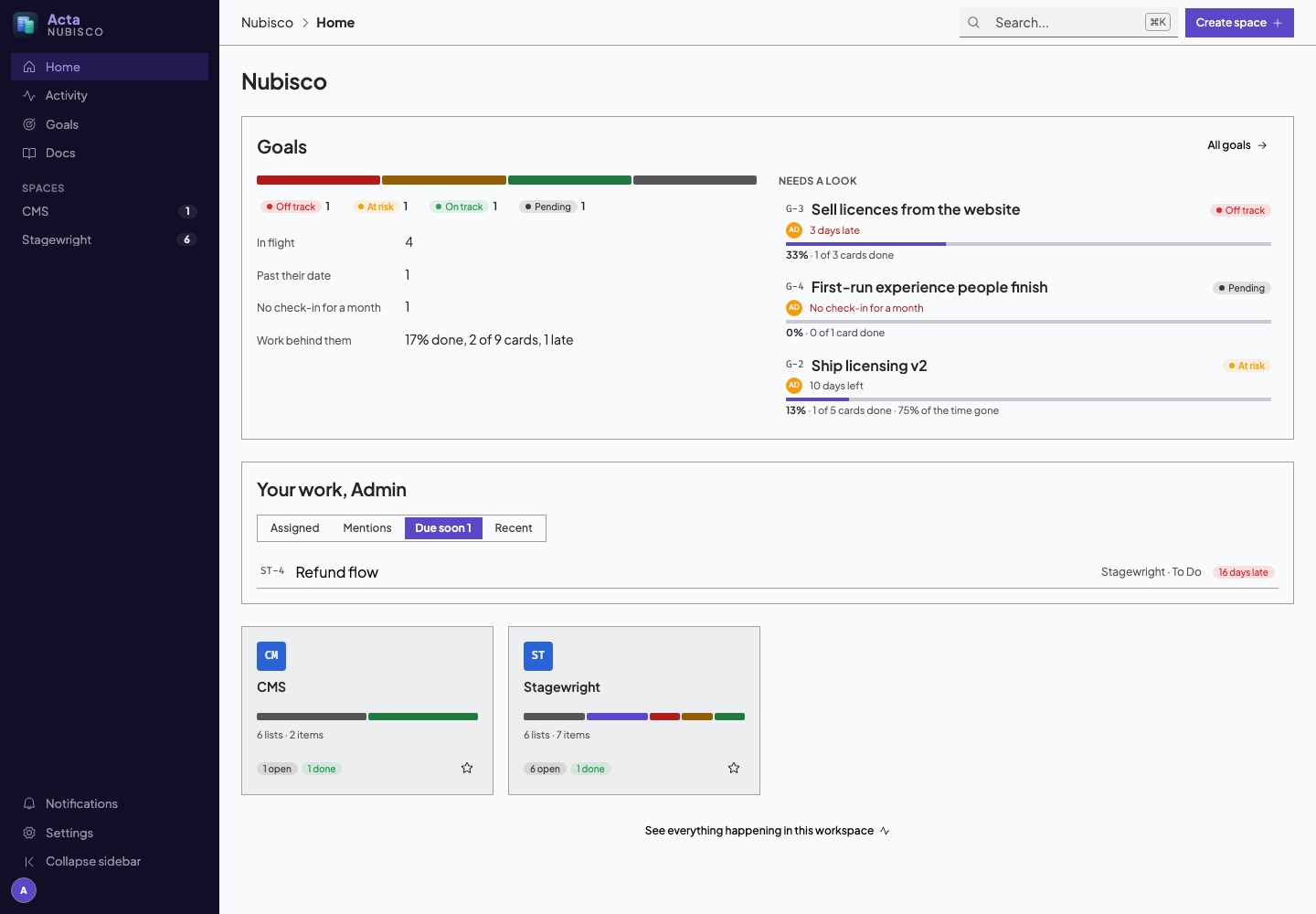
Under Next up, Home shows how every goal stands:
- A bar of goals by status, worst first, with the counts beside each status.
- How many are in flight, how many are past their date, how many have had no check-in for a month, and the work across every goal in flight, counting each card once.
- Needs a look: the goals that are off track, at risk, past their date or quiet, worst first. When nothing needs a look, the top-level goals in flight instead.
Every term there has an info mark: hover it for what "in flight", "past their date" and the rest mean, and hover a status for what it says about a goal.
The Goals page has the same breakdown above the full list, where clicking a status filters the list to it. The list is in tree order, so a sub-goal sits under the goal it serves. Tabs narrow it to goals you own, goals you follow, or the archive.
The goals walkthrough
The first time you open Goals, a short walkthrough explains what a goal is, how status differs from progress, and how cards count towards one. To see it again, go to Settings → Walkthroughs and press Play now, or Reset it so it plays the next time you open Goals.
Archiving and deleting
Archiving puts a goal away; restoring brings it back. Delete is permanent and only offered once a goal is archived, the same as a card. Deleting a goal takes its check-ins with it, and leaves its cards and sub-goals alone: the sub-goals become top-level goals.
From an agent
Everything here is available over MCP through goal_list, goal_get and goal_write, so an agent can create goals, link the cards it files, and post a check-in after a piece of work lands. See the tools.