Appearance
Backing tracks
The File Player card streams an audio file from disk and gives you its channels as ordinary outputs on the Wiring canvas. Stems to the PA, a click to the drummer, cues to whoever needs them, all wired like anything else in your rig.
Add one from the plugin browser under Stagewright, in 2, 4, 8 or 16 channel sizes. Pick the size that matches the file you bounce.
The card
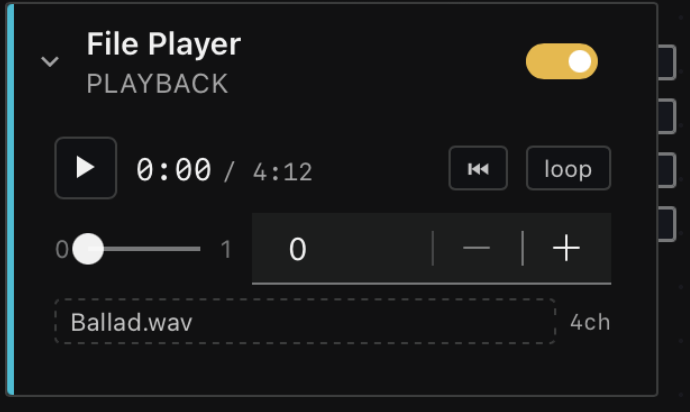
This is what you are looking for on the canvas: the title File Player with PLAYBACK under it. It is a Stagewright card rather than a hosted plugin, so it has no separate editor window. Everything it does is on the card itself.
| Control | What it does |
|---|---|
| Play | Starts and stops the track. Green while it is rolling. |
| 0:00 / 4:12 | Position and total length, in minutes and seconds. |
| ⏮ | Jumps back to the start without stopping. |
| loop | Repeats the track instead of stopping at the end. |
| Scrub bar | Drag to move through the track. |
| Gain | Track level in dB, from -60 to +6. |
| Track name | Click it to choose a file. Shows the file name, not the path. |
| 4ch | How many channels the loaded file has. |
The toggle at the top right is the card's ordinary enable switch, the same one every card has. Switching it off mutes the player's outputs.
One file, many channels
A song is one interleaved audio file. If your bounce has eight channels, the card has eight outputs, and you decide where each one goes:
| Channels | Typically |
|---|---|
| 1-2 | The band mix, to the PA |
| 3-4 | The in-ear feed |
| 5-6 | A click |
| 7-8 | Cues, count-ins, SFX |
They are plain channels in the order you bounced them. Nothing assumes channel 3 is a centre channel or that 5 and 6 are surrounds.
Why one file rather than one per stem. Stems in a single file cannot drift apart, because there is one reader and one position. A click that slowly walks away from the band is the kind of failure a rig cannot have, and keeping several files locked together is a problem we would rather not have to keep solving. The cost is that you bounce a multichannel file instead of separate ones.
Formats. WAV, AIFF, FLAC, Ogg Vorbis, Opus, MP3 and the formats macOS itself reads (M4A/AAC, CAF) all work, so you can usually just use the bounce you already have.
For a show, WAV or AIFF are still the ones to bounce. They are uncompressed, so nothing has to be decoded while you play, and seeking to a point in a long track is exact. A compressed file is perfectly usable, and it is the better choice when disk space or a slow drive is the real constraint.
Playing
Scrubbing works while stopped, because finding a spot in a track is something you do before you press play, not during.
Any Stage control can drive playback. Bind a button, a pad or a footswitch to the card's Playing parameter the same way you would bind anything else, and it starts and stops the track. On a stage that is usually a footswitch.
The card exposes three parameters, and they can all be bound or captured:
| Parameter | |
|---|---|
| Playing | On and off. The one parameter songs deliberately ignore, see below. |
| Gain | Track level, -60 to +6 dB. |
| Loop | Repeat at the end. |
How many players does a set need
The instinct is one card per song, twenty songs, twenty cards. Do not build it that way. Wire one File Player and let your songs swap the file in it.
The wiring is the part that takes work and the part that breaks. One player feeding the PA, the in-ears and the click is four wires drawn once. Twenty players is sixty wires, of which fifty-seven are idle at any moment, and every one of them is somewhere a cable can be wrong on a dark stage.
text
                        ┌──────────────┐
                        │ File Player  │  1-2 ──▶ PA
   song recall ────────▶│  (4 ch)      │  3   ──▶ in-ears
   swaps the file       │              │  4   ──▶ click
                        └──────────────┘
Recalling a song loads that song's track into the player you already wired. Nothing moves, nothing gets re-patched, and the signal path is the same on song one and song twenty.
When a second player genuinely earns its place:
- A different routing shape. Walk-in music that goes only to the PA, with no click and no in-ear feed, is a different set of wires and belongs on its own card.
- Two things that must overlap. One player cannot play two files at once, so if a track has to keep running while the next one starts, that is two players.
- A different channel count. A 2-channel interlude and your 8-channel show stems are not the same card.
If you do run more than one, rename them. Select the card and change its name in the inspector, to something like Stems and Walk-in, so the Set view and your bindings read as the thing they do rather than as two cards both called File Player.
Putting tracks in songs
A song captures which track each File Player was holding alongside everything else it remembers. Recalling that song arms the track: the file is loaded and cued to the start, ready to go.
The usual way to build a set:
- Wire your File Player once, into the PA, in-ears and click.
- Load the first song's track into it, and set anything else that song needs (amp channel, patch, mutes, levels).
- Capture the song. The track travels with it.
- Load the next song's track, change whatever else differs, capture that one.
- Repeat. The wiring never changes again.
On the night, stepping to a song gets its track loaded and cued while the rest of the rig changes around it. Tracks are armed last, after the rig is in place, so the track is never waiting on a plugin that is still loading.
Recalling a song never starts playback. Stepping through your setlist between songs, or nudging a foot controller by accident, must not begin playing audio at an audience. The song gets the track ready and you start it. This is the one parameter a song deliberately refuses to carry, even if you captured the song while the track was rolling.
A song remembers the rack it was captured in. If a song lives in a different rack, recalling it switches racks first and then applies, so a set can cross racks without you doing anything about it.
If a song should not touch a player, turn off Recalled by songs on that card. A walk-in music player that you drive by hand, and that no song should reach into, is exactly what that switch is for.
Keeping tracks with the project
Keep your tracks in the same folder as the project and the show travels. You do not have to do anything special: when you save, any track sitting inside the project's folder is recorded by its name rather than by where it happens to live on this machine.
text
Tonight/
  show.swproj
  opener.wav
  second-song.wav
Copy that whole folder to another machine, a USB stick or the venue's laptop, and it opens with every track still attached. Sub-folders work too, so Tonight/stems/click.wav travels just as well.
A track kept outside the project's folder, in a sample library somewhere else, keeps its full path instead. There is nothing for it to be relative to, so it is remembered exactly where it is. That is the right answer for a library you always have mounted, and the wrong one for a show you hand to someone else, which is why keeping tracks beside the project is worth the copy.
When a track is missing
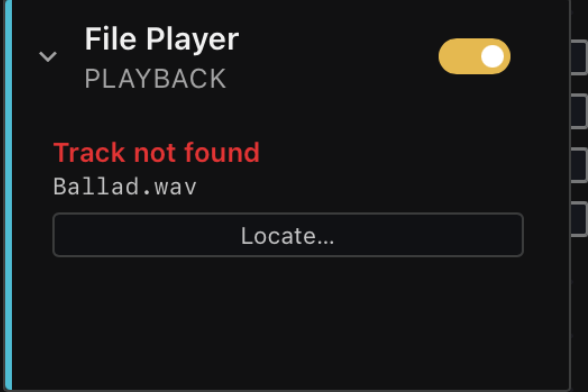
If the file is not there, the card says so in red and names the file it was looking for, and there is a Locate… button to point it somewhere new.
The project still opens, every wire survives, and the card plays silence. A rig that opens on a machine without its tracks is still a rig you can work on. This is the same thinking as a MIDI card that keeps its mapping when the controller is unplugged rather than deleting itself.
Dropouts
If the disk cannot keep up, the card shows a dropout count. The audio thread never waits for the disk, so an underrun costs you the gap and nothing else, but you are told it happened. If you see dropouts, the usual causes are a slow external drive, a network volume, or a drive that is busy with something else.
What this is not
There is no timeline, no clip grid, no warping and no time-stretch. Tracks play at their own rate. Stagewright is a live-performance host, not a DAW, and this feature exists so a backing-track rig works on stage, not so you can arrange music here.